
UI Customization
Customize BrickTracker's interface appearance, behavior, and default settings to match your preferences.
Interface Overview
BrickTracker's interface can be customized in several areas:
- Default sorting: How collections are ordered by default
- UI visibility: Show/hide specific interface elements
- Grid behavior: Filter and sort display options
- Display formats: Date, currency, and time formats
- Accordion behavior: How expandable sections work
Optional: Shuffle the lists on the front page.
# Legacy name: RANDOM
BK_RANDOM=false
Default Sort Orders
Note on *_DEFAULT_ORDER:
If set, it will append a direct ORDER BY <whatever you set> to the SQL query while listing objects. You can look at the structure of the SQLite database to see the schema and the column names. Some fields are compound and not visible directly from the schema (joins). You can check the query in the */list.sql and */base/*.sql files in the source to see all column names.
The usual syntax for those variables is "<table>"."<column>" [ASC|DESC]. For composite fields (CASE, SUM, COUNT) the syntax is <field>, there is no <table> name.
For instance:
"table"."name"(by"table"."name", default order)"table"."name" ASC(by"table"."name", ascending)"table"."name" DESC(by"table"."name", descending)"field"(by"field", default order)
You can combine the ordering options. You can use the special column name 'rowid' to order by insertion order.
Optional: Change the default order of sets. By default ordered by insertion order.
Useful column names for this option are:
"rebrickable_sets"."set": set number as a string (e.g., "10255-1")"rebrickable_sets"."number": the number part of set as text (e.g., "10255")"rebrickable_sets"."version": the version part of set as an integer (e.g., 1)"rebrickable_sets"."name": set name"rebrickable_sets"."year": set release year"rebrickable_sets"."number_of_parts": set number of parts"bricktracker_sets"."purchase_date": purchase date (as REAL/Julian day)"bricktracker_sets"."purchase_price": purchase price"total_missing": number of missing parts (composite field)"total_damaged": number of damaged parts (composite field)"total_minifigures": number of minifigures (composite field)
BK_SETS_DEFAULT_ORDER="rebrickable_sets"."year" DESC, "rebrickable_sets"."name" ASC
BK_SETS_DEFAULT_ORDER="rebrickable_sets"."number_of_parts" DESC
BK_SETS_DEFAULT_ORDER="total_missing" DESC, "rebrickable_sets"."year" ASCOptional: Change the default order of parts. By default ordered by insertion order.
Breaking Change in v1.4
Column references for BK_PARTS_DEFAULT_ORDER changed from "bricktracker_parts" to "combined":
| Before | After |
|---|---|
"bricktracker_parts"."spare" | "combined"."spare" |
"bricktracker_parts"."part" | "combined"."part" |
"bricktracker_parts"."quantity" | "combined"."quantity" |
Update any custom values or remove the setting to use the new defaults.
Useful column names for this option are:
"combined"."part": part number (e.g., "3001")"combined"."spare": part is a spare part (0 or 1)"combined"."quantity": quantity of this part"combined"."missing": number of missing parts"combined"."damaged": number of damaged parts"rebrickable_parts"."name": part name"rebrickable_parts"."color_name": part color name"total_missing": total missing across all sets (composite field)"total_damaged": total damaged across all sets (composite field)"total_quantity": total quantity across all sets (composite field)"total_sets": number of sets containing this part (composite field)"total_minifigures": number of minifigures with this part (composite field)
BK_PARTS_DEFAULT_ORDER="total_missing" DESC, "rebrickable_parts"."name" ASC
BK_PARTS_DEFAULT_ORDER="rebrickable_parts"."color_name" ASC, "rebrickable_parts"."name" ASCOptional: Change the default order of minifigures. By default ordered by insertion order.
Useful column names for this option are:
"rebrickable_minifigures"."figure": minifigure ID (e.g., "fig-001234")"rebrickable_minifigures"."number": minifigure ID as an integer (e.g., 1234)"rebrickable_minifigures"."name": minifigure name"rebrickable_minifigures"."number_of_parts": number of parts in the minifigure"bricktracker_minifigures"."quantity": quantity owned"total_missing": number of missing parts (composite field)"total_damaged": number of damaged parts (composite field)"total_quantity": total quantity across all sets (composite field)"total_sets": number of sets containing this minifigure (composite field)
BK_MINIFIGURES_DEFAULT_ORDER="rebrickable_minifigures"."number" DESC
BK_MINIFIGURES_DEFAULT_ORDER="total_missing" DESC, "rebrickable_minifigures"."name" ASCOptional: Change the default order of storages. By default ordered by insertion order.
Useful column names for this option are:
"bricktracker_metadata_storages"."name": storage name"bricktracker_metadata_storages"."rowid": insertion order (special column)
BK_STORAGE_DEFAULT_ORDER="bricktracker_metadata_storages"."name" DESC
BK_STORAGE_DEFAULT_ORDER="bricktracker_metadata_storages"."rowid" DESCOptional: Change the default order of purchase locations. By default ordered by insertion order.
Useful column names for this option are:
"bricktracker_metadata_purchase_locations"."name": purchase location name"bricktracker_metadata_purchase_locations"."rowid": insertion order (special column)
BK_PURCHASE_LOCATION_DEFAULT_ORDER="bricktracker_metadata_purchase_locations"."name" DESC
BK_PURCHASE_LOCATION_DEFAULT_ORDER="bricktracker_metadata_purchase_locations"."rowid" DESCOptional: Change the default order of wishlist sets. By default ordered by insertion order.
Useful column names for this option are:
"bricktracker_wishes"."set": set number as a string (e.g., "10255-1")"bricktracker_wishes"."name": set name"bricktracker_wishes"."year": set release year"bricktracker_wishes"."number_of_parts": set number of parts"bricktracker_wishes"."theme_id": theme ID"bricktracker_wishes"."rowid": insertion order (special column)
BK_WISHES_DEFAULT_ORDER="bricktracker_wishes"."year" DESC, "bricktracker_wishes"."name" ASC
BK_WISHES_DEFAULT_ORDER="bricktracker_wishes"."number_of_parts" DESC
BK_WISHES_DEFAULT_ORDER="bricktracker_wishes"."set" ASC
Display Options
Sort and Filter Controls
Optional: Make the grid filters displayed by default, rather than collapsed
BK_SHOW_GRID_FILTERS=trueOptional: Make the grid sort displayed by default, rather than collapsed
BK_SHOW_GRID_SORT=trueOptional: Show duplicate filter button on sets page
BK_SHOW_SETS_DUPLICATE_FILTER=trueOptional: By default, accordion items are linked together and only one can be in a collapsed state. This makes all the items indepedent.
BK_INDEPENDENT_ACCORDIONS=true
Purchase Date and Currency Formats
Optional: Format of the timestamp for purchase dates. Check https://docs.python.org/3/library/time.html#time.strftime for format details.
BK_PURCHASE_DATE_FORMAT=%d/%m/%YOptional: Currency to display for purchase prices.
BK_PURCHASE_CURRENCY=€Element Visibility
Individual Features
Optional: Hide all individual minifigures UI elements (navbar menu item, links from minifigure detail pages). Does not disable the routes.
BK_HIDE_INDIVIDUAL_MINIFIGURES=trueOptional: Enable read-only mode for individual minifigures. All pages remain accessible but editing fields are disabled, delete buttons are hidden, and write operations are blocked.
BK_DISABLE_INDIVIDUAL_MINIFIGURES=trueOptional: Hide all individual parts UI elements (navbar menu item, "Add Parts" button, links from part detail pages). Does not disable the routes.
BK_HIDE_INDIVIDUAL_PARTS=trueOptional: Enable read-only mode for individual parts and lots. All pages remain accessible but editing fields are disabled, delete buttons are hidden, and write operations are blocked.
BK_DISABLE_INDIVIDUAL_PARTS=trueOptional: Hide the "Add to individual parts" option in set parts row menus. Useful when individual parts tracking is enabled but quick-add is not needed.
BK_HIDE_QUICK_ADD_INDIVIDUAL_PARTS=trueMenu and Navigation
Optional: Hide the 'Instructions' entry from the menu. Does not disable the route.
BK_HIDE_ALL_INSTRUCTIONS=falseOptional: Hide the 'Minifigures' entry from the menu. Does not disable the route.
BK_HIDE_ALL_MINIFIGURES=falseOptional: Hide the 'Parts' entry from the menu. Does not disable the route.
BK_HIDE_ALL_PARTS=falseOptional: Hide the 'Problems' entry from the menu. Does not disable the route.
# Legacy name: BK_HIDE_MISSING_PARTS
BK_HIDE_ALL_PROBLEMS_PARTS=falseOptional: Hide the 'Sets' entry from the menu. Does not disable the route.
BK_HIDE_ALL_SETS=falseOptional: Hide the 'Storages' entry from the menu. Does not disable the route.
BK_HIDE_ALL_STORAGES=falseOptional: Hide the 'Statistics' entry from the menu. Does not disable the route.
BK_HIDE_STATISTICS=falseOptional: Hide the 'Instructions' entry in a Set card
BK_HIDE_SET_INSTRUCTIONS=falseOptional: Hide the 'Wishlist' entry from the menu. Does not disable the route.
BK_HIDE_WISHES=falseOptional: Hide the 'Add' entry from the menu. Does not disable the route.
BK_HIDE_ADD_SET=trueOptional: Hide the 'Add' entry from the menu. Does not disable the route.
BK_HIDE_ADD_BULK_SET=trueOptional: Hide the 'Admin' entry from the menu. Does not disable the route.
BK_HIDE_ADMIN=trueOptional: Admin sections to expand by default (comma-separated list). Valid sections: authentication, instructions, image, theme, retired, metadata, owner, purchase_location, status, storage, tag, database
# Default: database (maintains original behavior with database section expanded)
BK_ADMIN_DEFAULT_EXPANDED_SECTIONS=database,theme
BK_ADMIN_DEFAULT_EXPANDED_SECTIONS=instructions,metadata
BK_ADMIN_DEFAULT_EXPANDED_SECTIONS=   (all sections collapsed)
Link Configuration
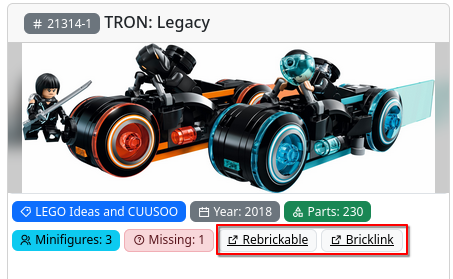
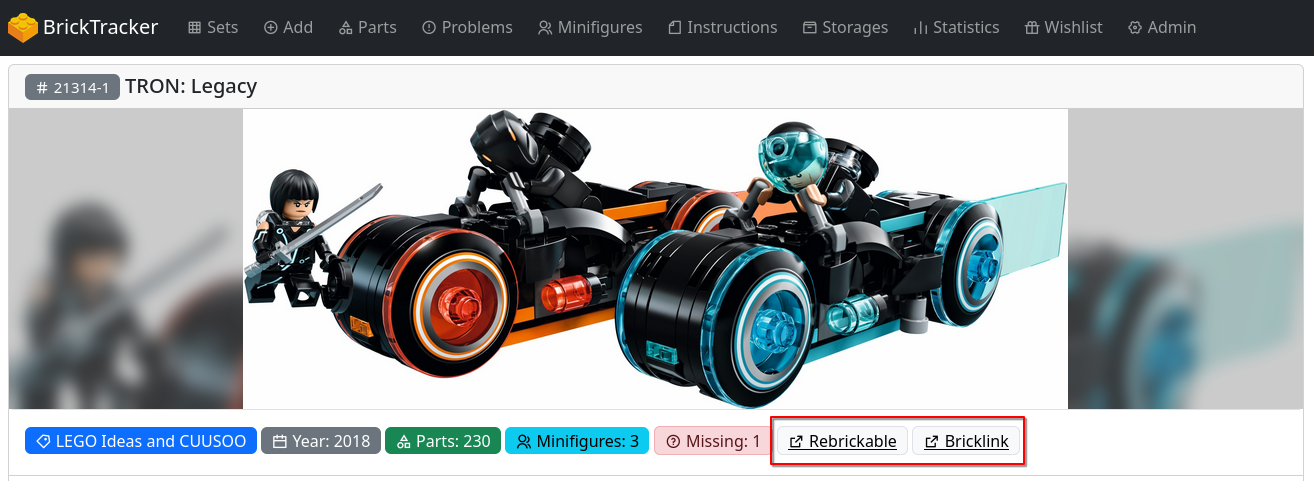
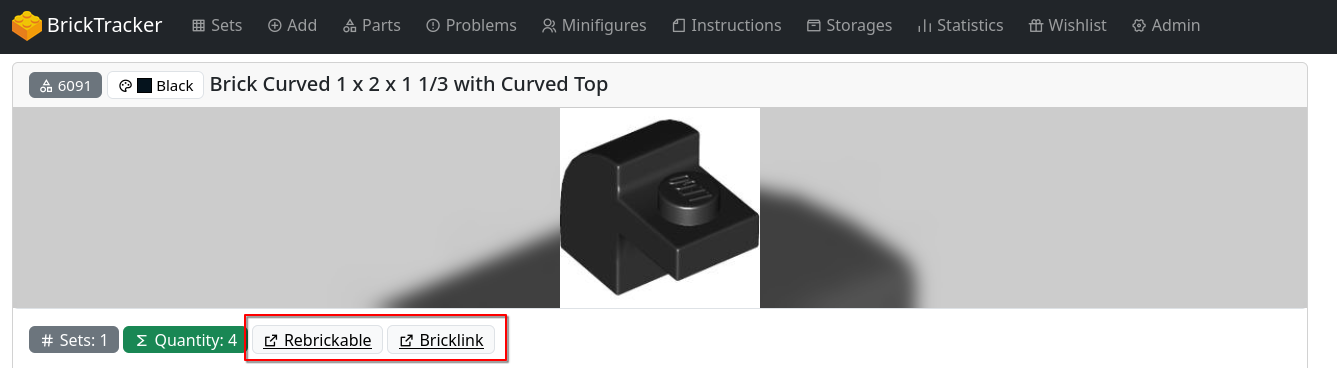
Optional: Display Rebrickable links wherever applicable
BK_REBRICKABLE_LINKS=trueOptional: Display Bricklink links wherever applicable
BK_BRICKLINK_LINKS=trueThese links will show up whereever applicable:
Notes Display
Sets support a text notes/comments field accessible via Management -> Notes on the set detail page. These two settings control where notes are shown.
Optional: Show set notes on grid view cards. When enabled, notes display as an info alert below the badges on each set card.
BK_SHOW_NOTES_GRID=trueOptional: Show set notes on set detail pages. Enabled by default.
# Default: true
BK_SHOW_NOTES_DETAIL=false
Both settings can be changed via Admin -> Live Settings without a container restart.
Badge Order
Control which badges appear and in what order on set cards and set detail pages. Both settings accept a comma-separated list of badge keys.
Available badge keys: theme, tag, year, parts, instance_count, total_minifigures, total_missing, total_damaged, owner, storage, purchase_date, purchase_location, purchase_price, instructions, rebrickable, bricklink
Optional: Set badge order on set grid cards.
# Default: theme,year,parts,total_minifigures,owner
BK_BADGE_ORDER_GRID=theme,year,parts,owner,storage,purchase_priceOptional: Set badge order on set detail pages. By default all 16 badges are shown.
BK_BADGE_ORDER_DETAIL=theme,tag,year,parts,total_minifigures,total_missing,total_damaged,owner,storage,purchase_date,purchase_location,purchase_price,instructions,rebrickable,bricklink,instance_countBoth settings can be changed via Admin -> Live Settings without a container restart.
Set Parts
Optional: Hide the 'Damaged' column from the parts table.
BK_HIDE_TABLE_DAMAGED_PARTS=trueOptional: Hide the 'Missing' column from the parts table.
BK_HIDE_TABLE_MISSING_PARTS=trueOptional: Hide the 'Checked' column from the parts table.
BK_HIDE_TABLE_CHECKED_PARTS=true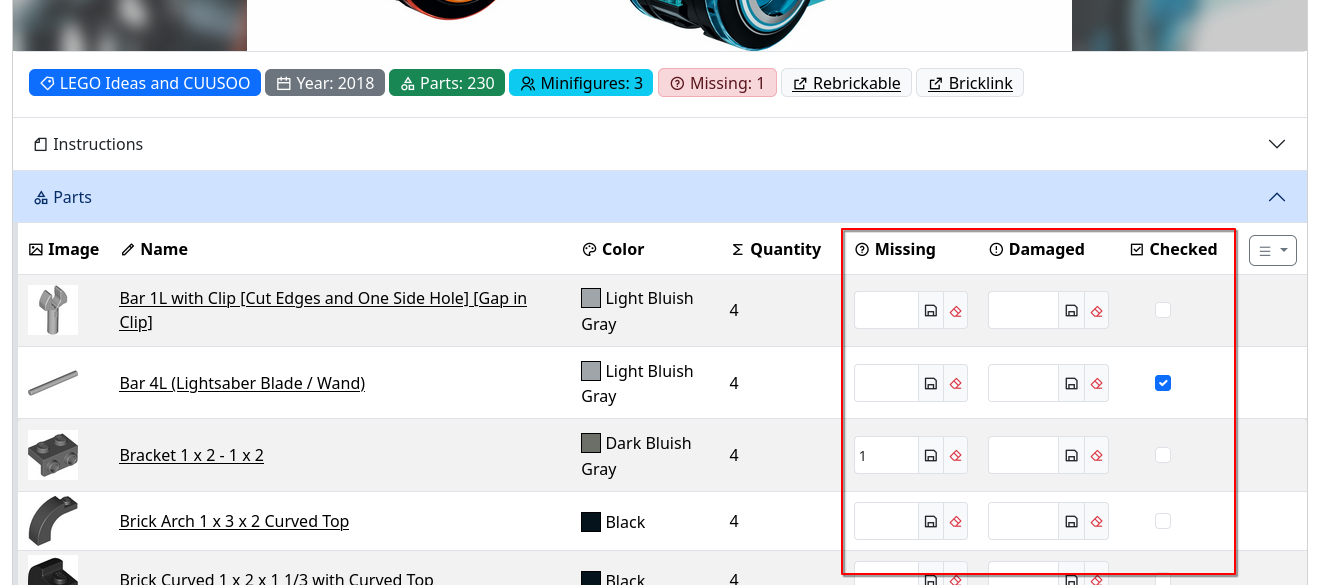
Set Consolidation
Optional: Enable set consolidation/grouping on the main sets page. When enabled, multiple copies of the same set are grouped together showing instance count. When disabled, each set copy is displayed individually
BK_SETS_CONSOLIDATION=true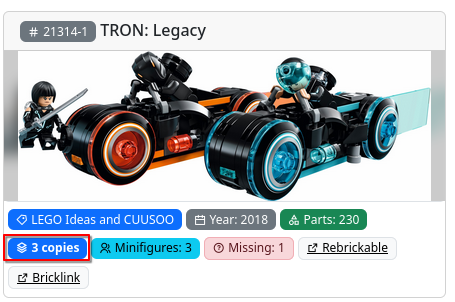
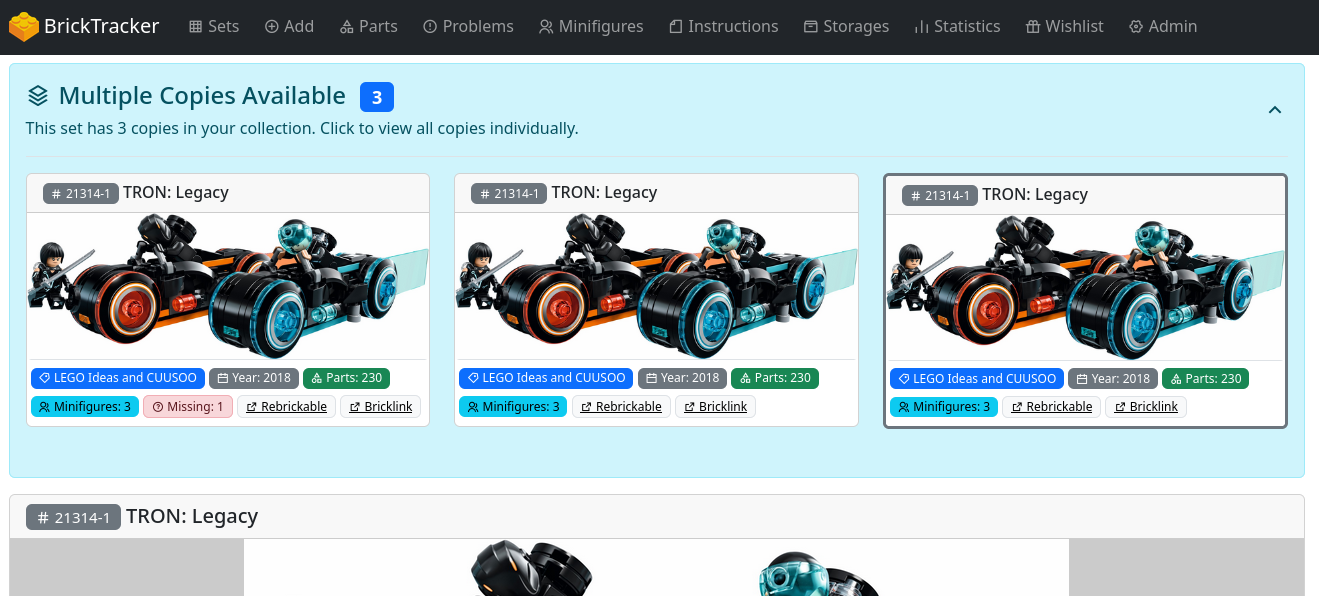
Statistics
Optional: Show collection growth charts on the statistics page
BK_STATISTICS_SHOW_CHARTS=trueOptional: Default state of statistics page sections (expanded or collapsed). When true, all sections start expanded. When false, all sections start collapsed.
BK_STATISTICS_DEFAULT_EXPANDED=trueDark Mode
Optional: Enable dark mode by default. When true, the application starts in dark mode.
BK_DARK_MODE=true